
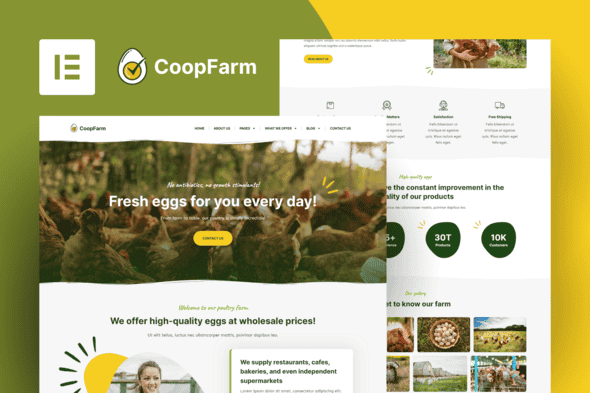
CoopFarm – Poultry Farm Elementor Pro Template Kit | Organic Site Kit
Original price was: $29.00.$5.80Current price is: $5.80.
Building an online presence for livestock farms, poultry producers, or agricultural suppliers requires clean layout structures optimized for product presentation and service details. CoopFarm delivers a structured set of WordPress templates that enable farm owners and agencies to deploy functional websites without writing custom code.
CoopFarm is a specialized Elementor Pro template kit designed for poultry farms, hatcheries, fresh egg distributors, and eco-friendly agricultural ventures. Operating on the WordPress platform using the Hello Elementor base theme, it offers ready-made page structures to showcase farm produce, pricing tiers, and company services. It is ideal for farm operators and web developers seeking swift website setup, but it is not intended for non-WordPress CMS platforms or sites that do not utilize Elementor.
| Technical Specification | Details |
|---|---|
| Product Format | Elementor Template Kit |
| Platform Stack | WordPress / Elementor Page Builder |
| Recommended Theme | Hello Elementor |
| Required Addons | The Plus Addon for Elementor, Elementor Pro (for full features) |
| Template Count | 10+ Pre-designed Layouts (17 Included Assets) |
| Mobile Layout | 100% Fully Responsive |
| Coding Requirement | Zero Code Required |
Key Features and Layout Components
CoopFarm equips business owners with dedicated pages structured specifically for agricultural marketing. Each component relies on standard Elementor builder settings, allowing straightforward modifications to typography, site colors, and page content.
Included Page Templates
- Homepage: A primary landing framework structured to highlight core farm offerings, product categories, and business values.
- About Page: Designed to detail farm history, operational standards, and organic practices.
- Product & Niche Pages: Specific templates for Chickens, Fresh Eggs, Hatching Eggs, Turkey, Our Products, and What We Offer.
- Business Essentials: Ready-to-use structures for Pricing tables, Testimonials, and Frequently Asked Questions.
- Blog & System Layouts: Archive Blog, Single Post, Contact Us, 404 Error page, Header, and Footer global components.
Installation Guidelines
Because CoopFarm is an Elementor Template Kit rather than a traditional standalone WordPress theme, installation involves importing template design data into your active WordPress site.
- Install and activate the free Hello Elementor theme via the WordPress Appearance panel.
- Ensure the Elementor and Envato Elements plugins are active, alongside The Plus Addon for Elementor. Activate and connect Elementor Pro to unlock header and footer capabilities.
- Go to Elements > Installed Kits and upload the template kit ZIP file directly without unzipping it.
- Click Install Requirements on the prompt banner to import any missing dependent plugins.
- Import the Global Kit Styles first to establish typography and global color variables before importing individual page layouts.
- Create new pages under Pages > Add New, set the page layout to Elementor Full Width inside settings, and insert your preferred layout from the My Templates library tab.
Frequently Asked Questions
Is CoopFarm a standalone WordPress theme?
No, CoopFarm is an Elementor Template Kit containing design layouts and style settings. It requires a active base theme like Hello Elementor and the Elementor plugin framework to run.
Is Elementor Pro mandatory to use this kit?
While basic page content imports into free Elementor, Elementor Pro is required to fully utilize global headers, footers, dynamic blog templates, and archive pages.
Are the demo images included with the template import?
The demo images included in the preview are sourced from Envato Elements. You must secure appropriate licenses for production use or replace them with your own business imagery.
1. Click Add to cart

2. Review your items and click Proceed to checkout

3. Fill in your billing details: Name, Email, and Password
4. Choose your preferred payment method
5. Click Pay via Paypal to proceed

6. Access Downloads to get your files

Related products


