
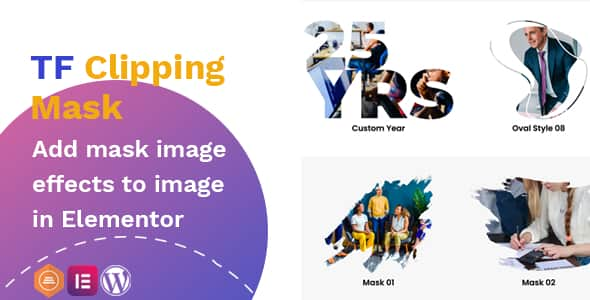
Clipping Mask addon – widget for Elementor | SVG Image Masking
Original price was: $29.00.$5.80Current price is: $5.80.
Standard WordPress image widgets often constrain layout design to conventional rectangular ratios or simple CSS border radii. TFClipping Mask AddOns for Elementor expands frontend design capabilities by allowing web builders to apply complex vector shapes and custom mask overlays directly to images within the Elementor editing interface.
This lightweight WordPress extension is designed for web developers, digital agencies, and UI designers using Elementor Page Builder. It simplifies image frame styling by combining preset mask libraries with full custom vector upload support. The plugin is best suited for creative agencies, portfolio sites, and modern SaaS landing pages that require unique graphic frames, while remaining unnecessary for basic textual blogs using default media displays.
| Specification | Details |
|---|---|
| Product Type | Elementor Page Builder Addon / Widget |
| Current Version | 1.0.2 (Updated April 2, 2022) |
| Page Builder Support | Elementor (Tested up to v3.6.1+) |
| Mask File Formats | SVG, PNG, and standard graphic formats |
| Built-in Library | 12+ Pre-designed Clipping Masks |
| Layout Compatibility | 100% Responsive & Cross-Browser Supported |
| Localization | 100% Multilingual Ready |
Core Capabilities and Feature Set
- Preset & Custom Mask Support: Ships with over 12 ready-to-use mask presets, with full support for uploading custom SVG or PNG shapes for infinite design configurations.
- Comprehensive Controls: Fine-tune mask size, position, rotation, and repeat behavior directly inside the Elementor control panel.
- Image & Overlay Adjustments: Set standard image properties including background attachment, position, size, height, width, and custom overlay colors.
- Integrated Content Options: Add titles, descriptions, links, and optional social media links directly within the masked element structure.
- Styling & Typography Control: Adjust HTML title tags, typography settings, text shadows, margins, box shadows, borders, and wrapper padding.
- Clean Markup: Built with valid, commented code to maintain fast render speeds and cross-browser consistency.
Changelog & Maintenance History
- Version 1.0.2 (April 2, 2022): Fixed operational compatibility bugs reported on Elementor version 3.6.1.
- Version 1.0.1 (September 1, 2020): Added dependency detection notice requiring Elementor installation upon activation.
Frequently Asked Questions
Can I upload custom vector shapes to use as clipping masks?
Yes. In addition to the 12+ built-in presets, you can create custom mask paths in graphic applications, export them as SVG or PNG files, and upload them directly into the widget library.
Is this plugin compatible with recent versions of Elementor?
Yes, the codebase is regularly updated to maintain compatibility with current Elementor releases, including specific bug fixes applied for Elementor 3.6.1 and later.
Does applying custom SVG masks impact site performance?
No. The widget uses native CSS mask properties and standard SVG paths rather than heavy JavaScript frameworks, ensuring fast rendering speeds and minimal impact on Core Web Vitals.
1. Click Add to cart

2. Review your items and click Proceed to checkout

3. Fill in your billing details: Name, Email, and Password
4. Choose your preferred payment method
5. Click Pay via Paypal to proceed

6. Access Downloads to get your files

Related products


