
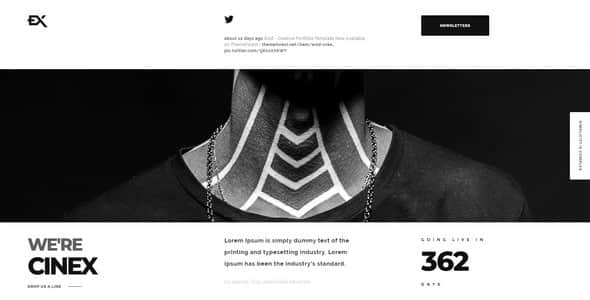
Cinex – Creative Coming Soon Template – Responsive HTML5
Original price was: $49.00.$9.80Current price is: $9.80.
Setting up a polished pre-launch page keeps potential clients engaged while full site development takes place. Cinex provides a lightweight static HTML5 layout built on the Bootstrap framework, tailored specifically for creative agency launches, artist portfolios, and visual media coming-soon screens. It offers built-in MailChimp newsletter integration, an interactive countdown timer, and AJAX-validated contact handling. Cinex is ideal for designers and photographers needing a temporary web presence; it is not suited for users seeking a fully managed CMS or WordPress back-end.
| Metric / Feature | Specification |
|---|---|
| Underlying Framework | Bootstrap v3.x |
| Code Compliance | W3C Validated HTML5 & CSS3 |
| Included File Formats | PHP, HTML, CSS, JS |
| Typography Support | Google Fonts (Raleway, Montserrat) |
| Icon Set Included | Ionicons v2.0.0 (733 Vector Icons) |
| Template Structure | One-Page Layout with 5 Content Sections |
| Form Functionality | AJAX Contact Form & MailChimp Newsletter Integration |
Core Functional Features
- Fullscreen Media Canvas: Supports high-definition background video playback and responsive image backgrounds for visual impact.
- Asynchronous Form Processing: Includes validation-ready contact forms and MailChimp newsletter signups that operate without triggering page refreshes.
- Interactive Countdown & UI Elements: Features a jQuery-powered event countdown, animated skill progress bars, and a custom interactive cursor with bounce effects.
- Touch-Optimized Slider: Provides touch-friendly gallery transitions for mobile and desktop previewing.
- Structured One-Page Layout: Contains designated sections for Home, Newsletter, About Us, Contact, and Social Feed display.
- Clean Semantic Codebase: Well-commented CSS and formatted HTML structure simplify developer edits and custom styling.
Frequently Asked Questions
Is Cinex a standalone WordPress theme?
No, Cinex is a static HTML5/CSS3 template based on the Bootstrap framework. It is designed to be hosted directly on standard web servers using standard HTML, CSS, JavaScript, and PHP files.
How is the countdown target date configured?
The launch target date is set directly within the JavaScript configuration file. You can adjust the year, month, day, and time parameters by updating the designated jQuery countdown script settings.
Does the MailChimp integration require custom server setups?
The included newsletter form utilizes standard PHP scripts to submit user entry data asynchronously to MailChimp. You simply need to insert your MailChimp API key and List ID into the provided backend configuration file.
1. Click Add to cart

2. Review your items and click Proceed to checkout

3. Fill in your billing details: Name, Email, and Password
4. Choose your preferred payment method
5. Click Pay via Paypal to proceed

6. Access Downloads to get your files

Related products


