
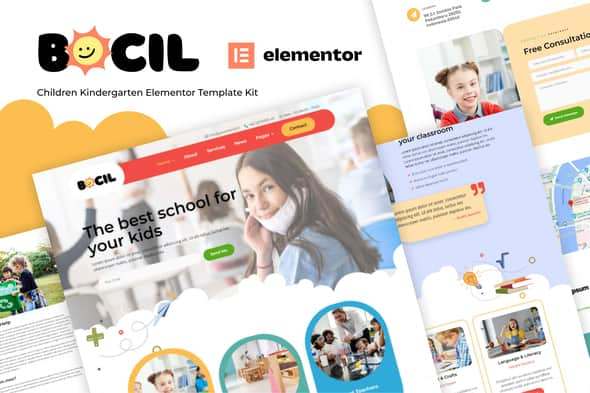
Bocil – Children Kindergarten Elementor Template Kit – Daycare Web
Original price was: $19.00.$3.80Current price is: $3.80.
Designing educational websites for early learning centers requires approachable layouts without compromising loading performance or modular flexibility. Bocil provides a pre-designed set of 11 Elementor page templates built specifically for kindergartens, daycares, preschools, and early childhood education centers. Powered by free WordPress plugins including Elementor and Header Footer & Blocks, this kit simplifies site deployment for agencies and freelancers building child-focused web properties. It is ideal for developers seeking a quick layout setup without writing custom CSS, though it is not suited for websites needing complex learning management systems (LMS) out of the box.
| Specification | Details |
|---|---|
| Product Type | Elementor Template Kit |
| Template Count | 11 Pre-built Layouts |
| Base Platform | WordPress |
| Required Page Builder | Elementor (Free Version) |
| Dependencies | MetForm, PowerPack Lite, Elementor Header Footer & Blocks |
| Target Niche | Kindergartens, Preschools, Nurseries, Childcare Businesses |
Included Layouts & Components
The kit includes essential structure pages to complete a nursery or childcare web portal without building from scratch:
- Homepage Variations: Two distinct home page options catering to different brand aesthetics.
- Core Info Pages: Dedicated templates for About Us, Services, and individual Service Single views to explain educational programs.
- Parent Engagement: Organized layouts for FAQs, Testimonials, and News updates.
- Utility Pages: Standardized Contact page and 404 error screen.
Plugin Dependencies & Setup Process
Bocil relies entirely on free ecosystem plugins to maintain design consistency and dynamic functionality:
- Elementor (Free): Handles primary page structure and drag-and-drop customization.
- Elementor – Header, Footer & Blocks: Manages site-wide headers, footers, and global block positions.
- MetForm: Powers custom contact and inquiry forms across the site.
- PowerPack Lite for Elementor: Supplies supplementary UI widgets for enhanced design flexibility.
Installation Guidelines
- Install and activate the Envato Elements plugin through the WordPress admin menu.
- Upload the kit file directly under Elements > Installed Kits (do not extract the archive prior to upload).
- Click Install Requirements to automatically enable all required free plugins before importing pages.
- Create a new page, set the template layout to Elementor Full Width, and disable the default page title in the settings panel.
- Open the Elementor library modal, navigate to My Templates, and import your desired page layout.
Frequently Asked Questions
Does the Bocil kit require an active Elementor Pro license?
No. The kit is built around free plugins, including the free edition of Elementor and Elementor – Header, Footer & Blocks. You do not need to purchase Elementor Pro to display headers, footers, or dynamic form layouts.
Are the demo images included with the kit import?
Demo images sourced from Envato Elements are included for layout demonstration. To use these specific assets on a production site, you must license them separately via Envato Elements, or substitute them with your own media assets.
1. Click Add to cart

2. Review your items and click Proceed to checkout

3. Fill in your billing details: Name, Email, and Password
4. Choose your preferred payment method
5. Click Pay via Paypal to proceed

6. Access Downloads to get your files

Related products


