
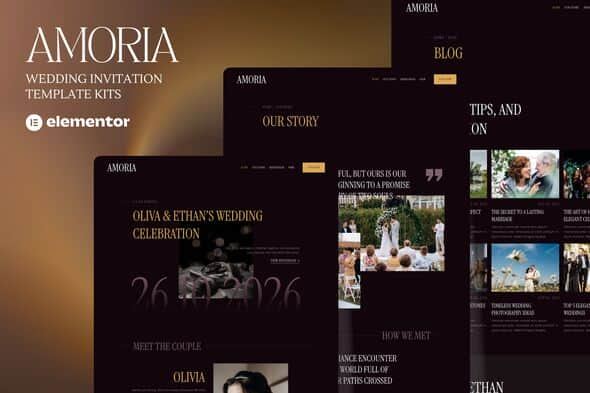
Amoria – Dark Luxury Wedding Invitation Website Elementor Template Kits
Original price was: $29.00.$5.80Current price is: $5.80.
Setting up a dark-aesthetic wedding event site often requires significant custom styling to handle dark background contrast, RSVP forms, and visual galleries cleanly. Amoria provides a pre-designed layout collection built specifically for the Elementor drag-and-drop page builder.
Amoria is a dark luxury wedding invitation website template kit designed for couples, wedding planners, and agency developers building event microsites. Built on Elementor with Metform and Jeg Elementor Kit, it delivers 10 ready-to-import page layouts including custom RSVP and gallery sections. It is ideal for users seeking rapid visual customization without writing code, but is not suitable for non-Elementor page builders or standalone WordPress theme installations.
| Attribute | Details |
|---|---|
| Product Type | Elementor Template Kit |
| Page Count | 10 Pre-designed Templates |
| Primary Builder | Elementor (Free / Pro compatible) |
| Required Plugins | Jeg Elementor Kit, Metform, The Plus Add-On |
| Design Aesthetics | Dark Luxury, High-Contrast Typography, Elegant UI |
| Included Pages | Homepage, Our Story, Bridesmaid, Blog, RSVP, Gallery, Registry, Countdown, 404, Contact Us |
| Layout Requirement | Elementor Full Width Page Setting |
Core Features & Included Layouts
- 10 Page Templates: Pre-built designs covering Homepage, Our Story, Bridesmaid, Blog, RSVP, Gallery, Registry, Countdown, 404, and Contact Us.
- Visual Editing: Fully customized using Elementor’s drag-and-drop interface without manual code edits.
- Global Style Controls: Modify typography presets and color palettes across the entire kit from a centralized panel.
- Form Integration: Built-in dynamic form setup using Metform for guest reservations and general inquiries.
- Header & Footer Builder Support: Structured for integration with Jeg Elementor Kit or Elementor Pro Theme Builder.
Installation & Setup Requirements
Amoria is an Elementor Template Kit and is not a standalone WordPress theme. It contains visual design data meant to be imported into an existing WordPress site running Elementor and a light base theme like Hello Elementor.
Header Configuration via Jeg Elementor Kit
To ensure global headers render correctly across all pages:
- Set the Page Layout on every published page to Elementor Full Width.
- Navigate to Jeg Elementor Kit > Header Template in the WordPress admin panel.
- Create a new header, set the display condition to All Site, and click edit to open Elementor.
- Open the template manager using the folder icon, navigate to My Templates, and select the imported Header layout.
MetForm Custom Form Setup
To configure the interactive RSVP forms included with the kit:
- Edit the target page in Elementor and click the Metform widget area.
- Select Edit Form, choose a blank form configuration, and click Edit Form.
- Click the folder icon to view My Templates inside the Metform builder window.
- Select the imported MetForm template from the list, insert it, and click update.
Frequently Asked Questions
Is Amoria a standalone WordPress theme?
No, Amoria is an Elementor Template Kit. It requires an active WordPress base theme alongside the free or pro version of Elementor to import and display page templates properly.
Do I need coding skills to customize these templates?
No coding is necessary. All content layout, font selections, color palettes, and image containers are editable directly within Elementor’s visual builder interface.
Are the stock photos included in the import file?
The kit contains placeholder assets sourced from Envato Elements. To use the exact images shown in the product preview, you must license them directly or upload your own photography.
1. Click Add to cart

2. Review your items and click Proceed to checkout

3. Fill in your billing details: Name, Email, and Password
4. Choose your preferred payment method
5. Click Pay via Paypal to proceed

6. Access Downloads to get your files

Related products


