
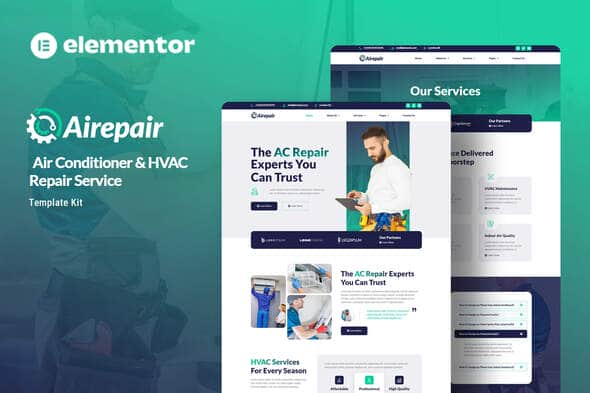
Airepair – Air Conditioner Repair Service Elementor Template Kit
Original price was: $24.00.$4.80Current price is: $4.80.
Setting up a website for local HVAC contractors or AC maintenance technicians requires a fast design workflow without bloated theme code. Airepair is an Elementor template kit engineered specifically for air conditioning repair services, home maintenance contractors, and handyman agencies operating on WordPress. It delivers 11 pre-designed layouts covering service breakdowns, pricing tiers, technician profiles, and contact channels. This kit is best suited for web developers and local service providers seeking a low-overhead visual site build using free core plugins, and is not designed for non-WordPress content management systems or custom app frameworks.
Technical Specifications
| Parameter | Details |
|---|---|
| Product Type | Elementor Template Kit |
| Core Page Count | 11 Pre-built Layouts |
| Page Builder Compatibility | Elementor (Free) |
| Required Free Plugins | ElementsKit Lite, Jeg Elementor Kit, Metform, Header Footer & Blocks Template |
| Recommended Base Theme | Hello Elementor |
| Typography / Fonts Used | Lato, Roboto |
Included Page Layouts & Structure
Airepair offers a structured set of pages designed to capture customer leads and display service capabilities clearly across mobile and desktop viewports:
- Home Page: Front-page layout featuring primary call-to-action blocks, service highlights, and emergency repair contact banners.
- About Us: Company history, mission presentation, and service values breakdown.
- Services & Single Service: Structured service overview listing alongside detailed individual service breakdown pages for specific HVAC offerings.
- Technician: Dedicated team grid layout to display certified technicians, qualifications, and staff profiles.
- Pricing: Clear service tier tables helping customers evaluate standard maintenance costs.
- FAQs: Collapsible question-and-answer section addressing common air conditioning repair inquiries.
- Blog & Single Blog: Content publishing templates for maintenance advice, seasonal tips, and company updates.
- Contact Us & 404 Page: Dedicated contact route with form integration and a customized 404 error page.
Plugin Dependencies & Integration Workflow
Unlike standard WordPress themes, template kits rely on page builders and helper plugins to manage layout blocks and forms. Airepair utilizes lightweight plugin utilities to maintain fast rendering speeds:
- Form Handling: Built-in dynamic forms utilize Metform, allowing customized inquiry fields without third-party form subscriptions.
- Header & Footer Layouts: Site-wide navigation structures are managed via Jeg Elementor Kit or Elementor Header & Footer Builder.
- Global Styling: Pre-configured color palettes and typography rules (Lato and Roboto) update site-wide upon importing the Global Kit Styles file.
Setup and Import Steps
To deploy this kit on a clean WordPress environment, follow standard template kit installation practices:
- Install and activate the free Hello Elementor theme, along with the standard Elementor plugin.
- Navigate to your WordPress dashboard, access the template kit importer plugin, and upload the unzipped template archive.
- Import the Global Kit Styles first to set up primary site settings, colors, and typography defaults.
- Import individual page templates in sequence and assign them to newly created Elementor Full Width pages.
Frequently Asked Questions
Does the Airepair template kit require Elementor Pro?
No, Airepair is designed to function with the free version of Elementor alongside free supporting plugins like ElementsKit Lite and Metform. However, if you already have Elementor Pro active, you can seamlessly integrate these templates with Pro’s native Theme Builder.
Are stock photos included with the template download?
The kit contains placeholder imagery sourced from Envato Elements for preview purposes. You will need to license these specific demo photos or swap them out with your own high-resolution media during site customization.
Can global colors and typography be changed easily?
Yes. By importing the Global Kit Styles file during initial setup, all primary typography (Lato and Roboto) and color swatches are assigned centrally within Elementor’s Site Settings menu for quick re-branding.
1. Click Add to cart

2. Review your items and click Proceed to checkout

3. Fill in your billing details: Name, Email, and Password
4. Choose your preferred payment method
5. Click Pay via Paypal to proceed

6. Access Downloads to get your files

Related products


