
Advanced Shipment Tracking Pro – WooCommerce Fulfillment Manager
Original price was: $56.00.$11.20Current price is: $11.20.
Managing post-purchase logistics in WooCommerce often turns into a chaotic mess of manual data entry, customer support inquiries, and lost tracking links. When buyers cannot easily monitor their packages, support queues quickly fill up with “Where is my order?” requests. This WooCommerce fulfillment manager resolves these operational headaches by automating how tracking details are attached, updated, and communicated to your customers.
Accelerate Your Order Dispatch Workflow
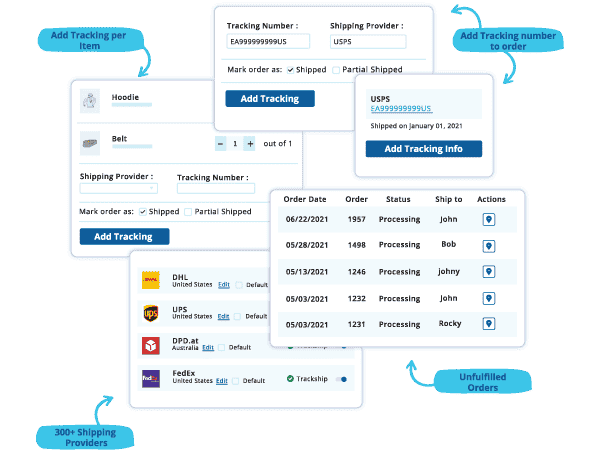
Instead of navigating through multiple screens, store administrators can input tracking details directly from the main orders list or within the individual order editing panel. Once updated, the system automatically sends a clear tracking link directly to the customer’s inbox and displays it within their account dashboard.
- Multi-Package Tracking Per Item: If an order contains items dispatched from different warehouses or shipped in separate boxes, you can assign unique tracking numbers to individual line items.
- Intelligent Carrier Auto-Detection: Save valuable seconds during manual entry. The system recognizes the format of the tracking number and instantly selects the correct shipping provider.
A Centralized Control Center for Your Shipments
Keep a close eye on your store’s shipping efficiency using a dedicated dashboard. This interface highlights unfulfilled orders requiring immediate action and displays a visual summary of your overall shipping performance. Team members can process orders directly from this screen, speeding up daily dispatch routines.
Global Carrier Network with Custom Branding
With native support for over 550+ shipping providers and carriers worldwide, you can offer precise, direct tracking links regardless of your shipping partner.
- White-Label Shipping Experience: Maintain brand consistency by customizing the carrier names and logos displayed to your buyers.
- Bespoke Carrier Profiles: If you work with local couriers or your own delivery fleet, you can easily define custom shipping provider names, custom tracking URLs, and custom brand graphics.
Tailored Email Notifications and Order Statuses
Standard WooCommerce transactional emails can be confusing and cluttered. The built-in email customizer lets you strip away irrelevant details, leaving only clean, actionable shipping data for the customer.
- Dynamic Tracking Widgets: Embed a responsive, visually appealing tracking widget into order confirmation emails and the “My Account” area. You can preview adjustments in real-time using the native WordPress customizer.
- Custom Fulfillment Statuses: Optimize your backend workflow by using dedicated statuses like “Partially Shipped” (to notify customers of split deliveries) or “Shipped” (releasing the default “Completed” status for virtual products).
Developer-Friendly APIs and Automated Integrations
For high-volume stores and automated operations, this extension provides robust integration paths to eliminate manual data entry entirely.
- Shipment Tracking API: Utilize dedicated API endpoints to push tracking numbers from third-party logistics (3PL) systems, automatically marking orders as fulfilled once all items are processed.
- API Carrier Name Mapping: Bridge the gap between external shipping software and your store by mapping mismatched carrier names to the correct database entries.
- PayPal Tracking Export: Automatically transmit tracking details, carrier data, and shipment dates directly to PayPal via their Tracking API. This proactive step helps resolve payment holds quickly and drastically reduces chargeback disputes.
- Bulk CSV Import: Upload hundreds of tracking numbers simultaneously using a straightforward CSV import tool, bypassing the need for individual manual edits.
Seamless Compatibility with the WooCommerce Ecosystem
This tool integrates smoothly with popular third-party plugins, including custom order numbering tools, advanced PDF invoicing systems, SMS notification plugins, and major shipping label platforms like Ordoro, ShipStation, RoyalMail Click & Drop, and AliExpress.
1. Click Add to cart

2. Review your items and click Proceed to checkout

3. Fill in your billing details: Name, Email, and Password
4. Choose your preferred payment method
5. Click Pay via Paypal to proceed

6. Access Downloads to get your files

Related products


