
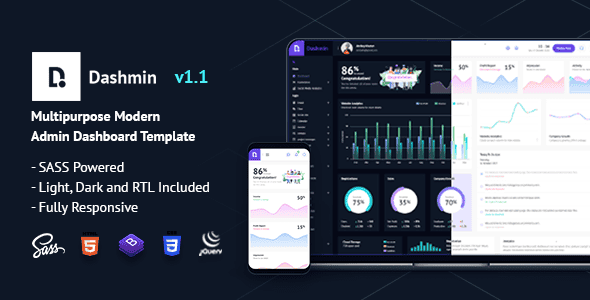
Dashmin | Responsive Admin Dashboard Template – Sass & Bootstrap
Original price was: $19.00.$3.80Current price is: $3.80.
Building web backends from scratch often leads to redundant UI development and inconsistent dashboard layouts. Dashmin provides a modular admin template built on Bootstrap v4.x and SASS, engineered specifically for web application developers, SaaS creators, and backend software engineers. It includes pre-integrated JavaScript applications—such as file management, real-time chat mockups, and task tracking—to accelerate project deployment. This asset is best suited for developers building admin panels, CRM systems, and enterprise tools requiring ready-to-use JS components, but it is not intended for non-technical users seeking a standalone CMS plugin.
Technical Specifications
| Attribute | Specification Details |
|---|---|
| Current Version | v1.1 (Released December 17, 2023) |
| Core Framework | Twitter Bootstrap v4.x & SASS |
| JS Base | jQuery, jQuery UI |
| Data Visualization | 6 Chart Libraries (ApexCharts, C3, Chartist, Chart.js, Flot, Morris) |
| Typography & Icons | Google Fonts (PT Sans), Icofont Icons |
| Code Standards | W3C Validated, Well-Commented Code Structure |
| Layout Design | 100% Fluid Responsive / Mobile-Adapted Layout |
Integrated Web Applications
Dashmin ships with pre-configured backend application interfaces that reduce UI integration time for common enterprise features:
- Communication Tools: Includes functional layouts for internal Email interfaces and direct Chat modules.
- Project & Task Management: Pre-built views for Todo lists, Project Managers, Task Lists, and Kanban-style Board creation.
- Resource & File Controls: Dedicated layouts for File Manager navigation and media storage organization.
- Billing & Invoicing: Integrated interfaces for Invoice listing, editing, detail rendering, and print previews.
Comprehensive UI Components & Plugin Stack
The dashboard incorporates a broad array of third-party JavaScript controls and custom elements to handle complex data input and interface behaviors:
- Form Controls & Pickers: Bootstrap Datepicker, Date Range Picker, Bootstrap Touchspin, Timepicker, Select2 dropdowns, and noUiSlider.
- Rich Text & Editors: Quill Text Editor and Summernote BS4 integration for input processing.
- Interactive Utilities: Dropzone for drag-and-drop uploads, SweetAlert2 for modal alerts, Toastr for system notifications, and Shepherd for user onboarding tours.
- Advanced Data Displays: Responsive DataTables, Bootstrap Treeview, Perfect Scrollbar integration, and Isotope filtering.
Page Templates & System Layouts
Beyond dashboard overviews, Dashmin provides ready-to-wire auxiliary views for administrative control and user account workflows:
- E-Commerce Modules: Product Catalogs, Product Details, Order Tracking, and Shopping Cart interfaces.
- Authentication Workflows: Login, User Registration, Forgot Password, and Password Reset screens.
- System Diagnostics: Custom 404 Error, 500 Error, Maintenance Mode, Session Timeout, and Access Denied templates.
- User & Public Pages: Account Profiles, Contact Directories, Pricing Tables, Timelines, and FAQ layouts.
Frequently Asked Questions
What frontend framework underpins the Dashmin template?
Dashmin is constructed using Bootstrap v4.x paired with SASS source files. This setup allows developers to easily adjust global styling variables, alter color schemes, and compile customized CSS builds for backend control panels.
Are data visualization controls included in the source code?
Yes, Dashmin incorporates six distinct JavaScript chart libraries, including ApexCharts, Chart.js, Flot, and Morris Chart. These plugins enable rapid rendering of real-time server telemetry, sales metrics, and complex analytical data.
Does this administrative layout work on non-desktop screens?
The template features a fully responsive, pixel-perfect design structure that automatically scales across desktop displays, tablets, and mobile smartphones without layout degradation.
1. Click Add to cart

2. Review your items and click Proceed to checkout

3. Fill in your billing details: Name, Email, and Password
4. Choose your preferred payment method
5. Click Pay via Paypal to proceed

6. Access Downloads to get your files

Related products


