
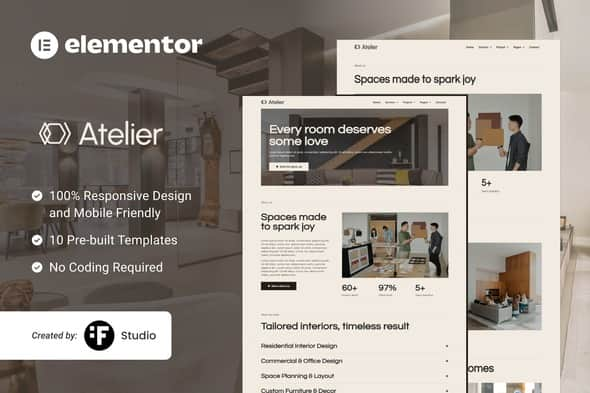
Atelier – Interior Design Elementor Template Kit – Clean UI
Original price was: $29.00.$5.80Current price is: $5.80.
Setting up a visual portfolio for an architecture studio or residential decorator often gets stalled by complex layout requirements and expensive page builders. Atelier solves this bottleneck by providing ten pre-built page structures created entirely with free Elementor widgets and open-source add-ons.
Atelier is an Elementor template kit structured for interior design firms, independent decorators, and architectural studios. Built on the free tier of Elementor alongside helper plugins like Jeg Elementor Kit and MetForm, it streamlines client project presentations and service landing pages without backend code modifications. It is best for agency developers needing rapid layout deployment, but not suited for site owners seeking a traditional WordPress theme with automatic demo content imports.
| Technical Specification | Details |
|---|---|
| Product Type | Elementor Template Kit |
| Core Page Builder | Elementor (Free Tier) |
| Layout Count | 10 Page Templates |
| Required Plugins | Elementor, ElementsKit Lite, Ultimate Addons for Elementor Lite, MetForm, Jeg Elementor Kit |
| Typography Stack | Questrial, Inter |
| Device Compatibility | Fully Responsive (Desktop, Tablet, Mobile) |
Included Page Templates
- Home: Main landing page featuring project previews and service overviews.
- Services: Structured list of client offerings and interior consulting options.
- Detail Service: Dedicated layout for specific design packages and breakdown of steps.
- Projects: Grid-based gallery showcase for architectural and design portfolios.
- Detail Project: Case study template highlighting project scope, images, and material lists.
- About: Profile section for studio history, design philosophy, and team members.
- Blog & Single Blog: Article listing and post layouts for content marketing and design news.
- 404 Page: Custom error page to route lost visitors back to primary pages.
- Contact: Communication page integrated with custom form containers.
Setup and Integration Steps
Header Template Setup via Jeg Elementor Kit
If you rely on Elementor Pro, global headers can be assigned via the native Theme Builder. For free Elementor setups, use the integrated Jeg Elementor Kit manager:
- Navigate to Jeg Elementor Kit > Header Template in your WordPress dashboard.
- Click Add New Header, set the display condition to All Site, and choose Create.
- Click the edit pencil icon to launch the Elementor builder interface.
- Select the folder icon to access the My Templates tab.
- Locate the imported header template, click Insert, configure styling if needed, and publish.
MetForm Custom Form Import
- Edit the page containing the contact container and select the MetForm block within the editor.
- Click Edit Form in the sidebar settings panel.
- Choose New, leave the layout set to blank, and click the Edit Form button.
- Click the gray folder icon, switch to the My Templates tab, select your imported MetForm template, and click Insert.
- Save changes by clicking Update.
Frequently Asked Questions
Is Atelier a standalone WordPress theme?
No, Atelier is an Elementor template kit. It contains visual page layouts designed specifically for the Elementor page builder and requires an active WordPress installation with the Elementor plugin enabled.
Do I need to buy Elementor Pro to use this kit?
No, this template kit is built using free Elementor widgets alongside free supporting plugins like ElementsKit Lite and Jeg Elementor Kit, eliminating the requirement for a paid Elementor Pro license.
Are stock photographs included in the kit download?
The kit contains placeholder imagery sourced from Envato Elements. To publish these exact photos on a live commercial domain, you must obtain proper licenses from the source provider or substitute them with your own project media.
1. Click Add to cart

2. Review your items and click Proceed to checkout

3. Fill in your billing details: Name, Email, and Password
4. Choose your preferred payment method
5. Click Pay via Paypal to proceed

6. Access Downloads to get your files

Related products


