
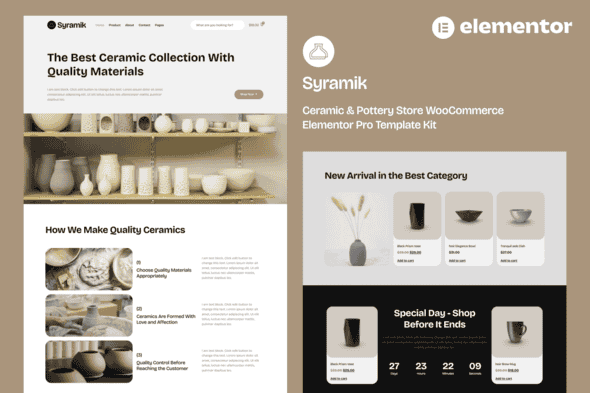
Syramik – Ceramic & Pottery Store WooCommerce Elementor Pro Template Kit
Original price was: $22.00.$4.40Current price is: $4.40.
Building an online showroom for artisanal ceramics and handmade pottery requires a clean visual focus that highlights texture, craft, and product details. Syramik delivers a contemporary visual layout designed specifically for ceramic artists, pottery studios, and boutique craft retailers setting up a modern web shop.
Syramik is a WooCommerce Elementor Pro template kit engineered for craft merchants, pottery studios, and e-commerce agency developers building on WordPress. Utilizing Elementor Pro and WooCommerce, this kit offers 15 distinct page layouts, complete custom store templates, and unified site styles. It is best suited for WordPress users seeking a ready-to-import design for selling physical artisanal products, but it is not compatible with alternative page builders or non-WordPress CMS platforms.
| Specification | Details |
|---|---|
| Product Type | Elementor Pro Template Kit |
| Target Platform | WordPress / WooCommerce |
| Required Page Builder | Elementor & Elementor Pro |
| Required Addons | The Plus Addons for Elementor |
| Recommended Base Theme | Hello Elementor |
| Total Template Count | 15 Pre-designed Templates |
Key Features & Template Breakdown
Syramik simplifies the design workflow by offering structured visual layouts tailored to high-end ceramics, personal pottery studios, and creative art services. Rather than starting from scratch, storefront builders can deploy cohesive typography, consistent color palettes, and organized product showcases across every customer touchpoint.
Included Page Templates
- Global Style: Centralized color scheme, typography, and site-wide visual rules.
- Home: Main landing page optimized for highlighting collections and artisan stories.
- Product & Product Details: Shop archive grid and single product display layouts for ceramic goods.
- Cart & Checkout: Functional e-commerce transaction pages formatted for WooCommerce.
- My Account: User account management dashboard template.
- About & Contact: Informational pages for studio backstories, inquiries, and locations.
- Blog & Blog Single: Content publishing templates for editorial updates and tutorials.
- FAQ & 404: Service details, store policies, and error handling layout.
- Header & Footer: Site-wide navigation and footer content structures.
Required Plugins and Dependencies
- Elementor (Free version)
- Elementor Pro (Upgrade required for theme builder and specific WooCommerce widgets)
- WooCommerce (For product catalog and payment processing)
- The Plus Addons for Elementor
Import and Setup Workflow
- Navigate to Plugins > Add New in your WordPress dashboard and install the Envato Elements plugin.
- Download your template kit file without unzipping it.
- Go to Elements > Installed Kits and click the Upload Template Kit button (or connect your account directly).
- Review the requirement banner at the top and select Install Requirements to enable all required plugins.
- Import the Global Kit Styles first to establish global font and color settings.
- Import individual page templates one at a time as needed for your site structure.
- Create a new page under Pages, select Edit with Elementor, set the layout to Elementor Full Width in page settings, and insert your imported layout from My Templates.
- Customize theme headers and footers via the Elementor Theme Builder menu.
Frequently Asked Questions
Is Syramik a standalone WordPress theme?
No, Syramik is an Elementor Template Kit containing page layouts and global styles rather than a standalone theme. It installs directly into WordPress to work alongside lightweight base themes such as Hello Elementor.
Is Elementor Pro required to use this kit?
Yes, several templates—including headers, footers, and dynamic WooCommerce store pages—rely on features provided by Elementor Pro. You will need an active Elementor Pro upgrade to access and edit all included template features.
Can I customize the demo imagery included in the templates?
Yes, all template layouts can be populated with your own photos and visual assets. Demo images provided during import are for visual preview purposes and can be easily replaced within the Elementor builder interface.
1. Click Add to cart

2. Review your items and click Proceed to checkout

3. Fill in your billing details: Name, Email, and Password
4. Choose your preferred payment method
5. Click Pay via Paypal to proceed

6. Access Downloads to get your files

Related products


