
FluxStudio – Content Creator Studio Elementor Template Kit | No Code
Original price was: $24.00.$4.80Current price is: $4.80.
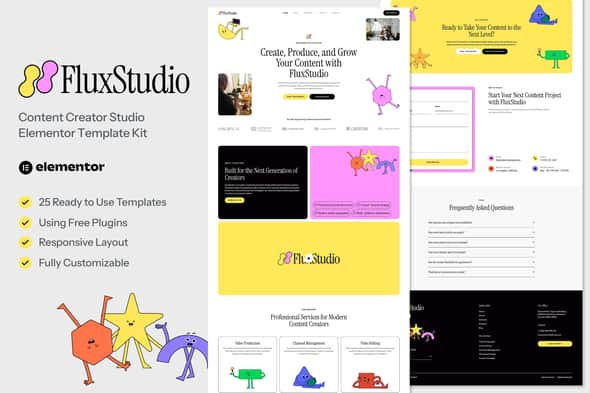
Setting up a digital creator platform often gets bogged down by heavy, bloated themes. FluxStudio takes a lighter approach as a visual Elementor Template Kit built specifically for video production teams, digital agencies, and independent content creators. Operating directly within the free Elementor builder ecosystem, it provides layout structures that allow rapid deployment without requiring custom code.
FluxStudio is a 20-page visual layout kit designed for YouTubers, creative studios, and online media brands. It runs on WordPress using free dependency plugins like ElementsKit Lite and MetForm, making it accessible without premium builder licenses. This solution is best suited for site builders seeking fast, visual design assembly; it is not suited for users expecting a standard, self-contained WordPress theme file (.zip theme package).
| Specification | Details |
|---|---|
| Product Type | Elementor Template Kit (Not a WordPress Theme) |
| Primary Builder | Elementor Free (Flexbox Container Enabled) |
| Page Layouts | 20 Ready-to-Use Pages |
| Template Elements | 25 Individual Block Templates |
| Required Plugins | Elementor, ElementsKit Lite, MetForm, Gum Elementor Addon |
| Recommended Base Theme | Hello Elementor (Free) |
| Browser Support | Chrome, Firefox, Safari, Opera |
Core Functional Features
- Zero Premium Dependencies: Works entirely with the free version of Elementor, eliminating mandatory upgrade costs.
- Complete Page Suite: Includes 20 distinct page layouts, covering Home, Services, Portfolio, Case Studies, Consultation, Career, Pricing, FAQs, and specialized Single Post layouts.
- Flexbox Container Architecture: Built using modern Elementor Flexbox Containers for optimized code output and clean visual alignment.
- Integrated Form Templates: Pre-designed block templates tailored for MetForm, covering booking requests, newsletter signups, and general contact forms.
- Modular Header & Footer Management: Leverages ElementsKit Lite to control site-wide global headers and footers easily from the WordPress dashboard.
- Responsive Layout Infrastructure: Adapts layout grids dynamically across mobile, tablet, and desktop viewports.
Included Template Breakdown
The kit contains ready-to-import layout data for the following structures:
- Site Foundations: Global Theme Style, Header, Footer
- Main Content Pages: Home, About, Services, Service Details, Process, Team
- Work & Case Studies: Portfolio, Portfolio Details, Case Studies
- Conversion & Utility Pages: Consultation, Contact, Pricing, FAQs, Career, Career Details, Testimonials, Coming Soon, 404 Page
- Publishing Layouts: Blog Index, Single Post Template
- Functional Forms: Form Booking, Form Newsletter, Form Contact
Import & Configuration Workflow
Because template kits contain raw JSON design data rather than standard theme code, setup follows a structured import sequence:
- Ensure the Hello Elementor parent theme is active via your WordPress dashboard.
- Install and activate the required free plugins: Elementor, ElementsKit Lite, MetForm, and Gum Elementor Addon.
- Enable Flexbox Container features inside Elementor Settings > Features.
- Upload the unextracted template kit file using the standard Template Kit Import tool under Tools > Template Kits.
- Import the Global Kit Styles first to establish site typography and color variables, followed by individual page templates as needed.
- Assign headers and footers globally within the ElementsKit Header Footer manager.
Frequently Asked Questions
Is FluxStudio a standard WordPress theme?
No, FluxStudio is an Elementor Template Kit. It does not replace your WordPress theme. Instead, it imports pre-designed visual page layouts directly into the Elementor page builder framework. It works best on top of lightweight base themes like Hello Elementor.
Do I need an active Elementor Pro license to use this kit?
No, Elementor Pro is not required. All visual components and page layouts included in FluxStudio are built to function using free base plugins, including Elementor Free, ElementsKit Lite, and MetForm.
How are interactive contact forms handled?
Forms are styled using MetForm block templates included in the kit. Once imported into your saved templates, these forms can be inserted directly into pages using the MetForm builder widget without writing custom HTML or handling back-end scripts manually.
1. Click Add to cart

2. Review your items and click Proceed to checkout

3. Fill in your billing details: Name, Email, and Password
4. Choose your preferred payment method
5. Click Pay via Paypal to proceed

6. Access Downloads to get your files

Related products


