
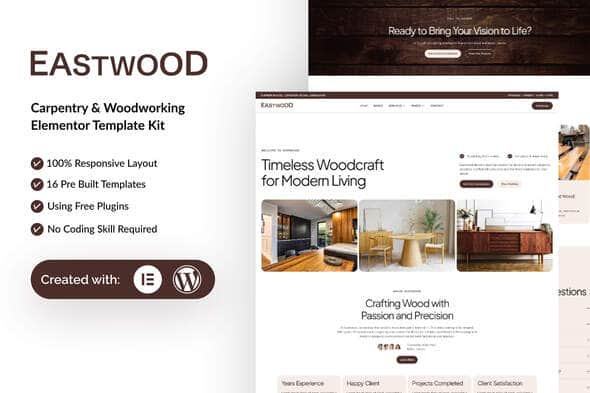
Eastwood – Carpentry & Woodworking Elementor Template Kit | WordPress
Original price was: $30.00.$6.00Current price is: $6.00.
Setting up a custom website for woodworking artisans or carpentry contractors requires balancing detailed project galleries with functional service enquiry workflows. Eastwood delivers a structured set of 16 pre-designed page layouts built specifically on WordPress using the Elementor Flexbox Container engine.
This kit is tailored for carpentry workshops, custom furniture makers, wood restoration specialists, and timber flooring contractors who need a professional online layout without purchasing premium plugin upgrades. It is ideal for developers and business owners seeking a code-free layout setup, though it is important to note that this product is an Elementor Template Kit rather than a standalone WordPress theme.
| Specification | Details |
|---|---|
| Product Type | Elementor Template Kit (Not a WP Theme) |
| Layout Engine | Elementor Flexbox Container |
| Page Count | 16 Ready-to-Use Layouts |
| Typography | 900+ Google Fonts Integrated |
| Premium Upgrades | None Required (Uses Free Add-ons) |
| Required Plugins | Elementor, ElementsKit Lite, MetForm, Gum Elementor Addon, Ultimate Addons for Elementor – Lite |
| Browser Compatibility | Chrome, Firefox, Safari, Opera |
Core Features & Design Capabilities
Eastwood focuses on structural clarity and modern design standards for modern craft businesses. Key capabilities include:
- Flexbox Container Architecture: Built using modern Elementor containers for lighter DOM output and improved rendering speed.
- Complete Page Set: Includes Home, About, Services, Service Details, Project, Pricing, Team, FAQ, Error 404, Blog, Single Post, and Contact pages.
- Global Styling Control: Centralized color palette and font controls allow site-wide visual adjustments from a single panel.
- Custom Form & Navigation Templates: Includes dedicated structural blocks for MetForm contact forms, newsletter signups, global headers, and footers.
- Fully Responsive Layouts: Automatically adjusts content alignment across desktop, tablet, and mobile viewports.
Setup and Import Workflow
Because template kits store design configuration data rather than theme logic, installation follows a specific import process using the standard Envato Template Kit Import plugin or native Elementor tools.
Form Configuration via MetForm
- Import the MetForm block templates from the kit package into your WordPress dashboard.
- Open your target page template in Elementor, locate the MetForm widget, and select Edit Form.
- Select Add Template, navigate to the My Templates tab, and insert your imported form layout.
- Save changes and update the page to render the active form.
Header and Footer Setup via UAE Lite
- Navigate to UAE > Header Footer in your WordPress administrative sidebar and create a new item.
- Name the layout (e.g., “Global Header”), set the display rule to Entire Website, and publish.
- Click Edit with Elementor, open the My Templates library, and insert the kit’s Header block. Repeat the process for the Footer layout.
- Note: If you use Elementor Pro, you can skip helper plugins and import these layouts directly into the native Elementor Theme Builder.
Frequently Asked Questions
Frequently Asked Questions
Is Eastwood a standalone WordPress theme?
No, Eastwood is an Elementor Template Kit. It contains page visual structures and styling parameters designed for Elementor. You must install a base WordPress theme (such as Hello Elementor) alongside the required plugins to use these templates.
Do I need paid versions of Elementor or third-party add-ons?
No premium licenses are required. All templates in this kit are configured to work with the free version of Elementor and its free complementary plugins (ElementsKit Lite, MetForm, Gum Elementor Addon, and Ultimate Addons for Elementor – Lite).
Are post content and demo imagery included upon import?
Sample blog post entries are not included; you must publish a few draft posts in WordPress for dynamic query loops to populate. Demo images are placeholdered from Envato Elements and should be replaced with your own licensed imagery.
1. Click Add to cart

2. Review your items and click Proceed to checkout

3. Fill in your billing details: Name, Email, and Password
4. Choose your preferred payment method
5. Click Pay via Paypal to proceed

6. Access Downloads to get your files

Related products


