
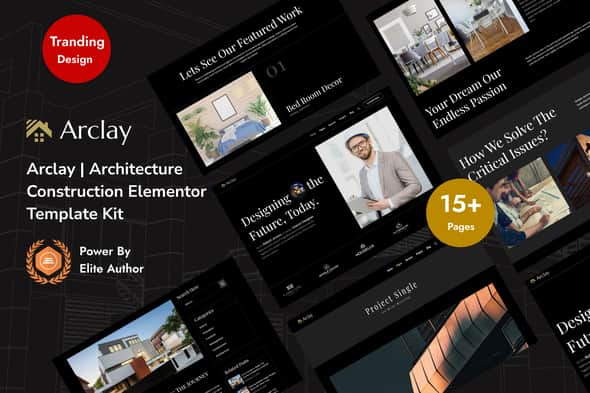
Arclay – Architecture Elementor Template Kit – Clean Design
Original price was: $29.00.$5.80Current price is: $5.80.
Building an architectural studio or creative agency website often requires a clean, structured layout without the overhead of heavy WordPress themes. Arclay provides a lightweight collection of pre-designed Elementor page templates engineered specifically for architecture firms, interior designers, and spatial design agencies.
This template kit runs on Elementor’s modern Flexbox Container system and pairs naturally with the free Hello Elementor theme, offering a visual drag-and-drop workflow that requires zero manual coding. It is best suited for web developers and agency teams needing a fast deployment framework with modular page components. However, it is not a standalone theme and requires an active Elementor setup.
| Specification | Details |
|---|---|
| Product Type | Elementor Template Kit (Not a WP Theme) |
| Page Builder Compatibility | Elementor (Flexbox Containers) |
| Recommended Base Theme | Hello Elementor (Free) |
| Required Plugins | Elementor, Jeg Elementor Kit, MetForm Lite |
| Total Templates Included | 14 Layout Files |
| Layout Style | Full-Width, 100% Mobile-Responsive |
Key Technical Features
- Flexbox Container Layouts: Built with Elementor’s latest container structures for lighter markup and faster page loading.
- Complete Page Set: Covers end-to-end site architecture from portfolio showcases to dedicated service pages.
- Form Integration: Includes styled container setups for MetForm Lite to handle client inquiries.
- Global Styling System: Centralized typography and color controls editable via standard Elementor global settings.
- Header and Footer Templates: Native template blocks manageable via the Jeg Elementor Kit builder or Elementor Pro Theme Builder.
Included Layout Templates
- Global Style Schema
- Home Page Layout
- About Us Page
- Contact Us Layout
- Service Overview Page
- Service Single Detail Page
- Portfolio Grid Layout
- Portfolio Single Showcase
- Testimonials Layout Block
- Blog Index Page
- Blog Single Article Template
- Global Header Block
- Global Footer Block
- Custom 404 Error Page
Setup and Configuration Guide
To import and configure Arclay on your WordPress site, follow these baseline steps:
- Ensure Elementor, Jeg Elementor Kit, and MetForm Lite plugins are installed and active.
- Import the kit package using the Envato Template Kit Import plugin or directly via Elementor Tools.
- Set your page layout to Elementor Full Width across all newly created pages to ensure global headers and footers display correctly.
- To assign global headers, navigate to Jeg Elementor Kit > Header Template, create a new entry with the “All Site” condition, and insert the included header layout.
- For custom forms, add the MetForm widget to your designated contact section, create a new form, and load the imported MetForm layout from your templates tab.
Frequently Asked Questions
Is Arclay a standalone WordPress theme?
No, Arclay is an Elementor Template Kit. It contains structured page content and design assets specifically formatted for the Elementor page builder plugin. You must install a base theme, such as Hello Elementor, prior to importing the kit.
Do I need Elementor Pro to use this kit?
Elementor Pro is not mandatory. The kit works using the free version of Elementor along with the included companion plugins (Jeg Elementor Kit and MetForm Lite). Header and footer management can be completed using the free Jeg Elementor Kit workflow.
Are the demo images included with the template download?
The kit uses placeholders and demo images sourced from Envato Elements. To use these specific photos live on your production server, you must license them individually or substitute them with your own media assets.
1. Click Add to cart

2. Review your items and click Proceed to checkout

3. Fill in your billing details: Name, Email, and Password
4. Choose your preferred payment method
5. Click Pay via Paypal to proceed

6. Access Downloads to get your files

Related products


