
Odynest – Travel & Tour Agency Elementor Template Kit | Responsive
Original price was: $25.00.$5.00Current price is: $5.00.
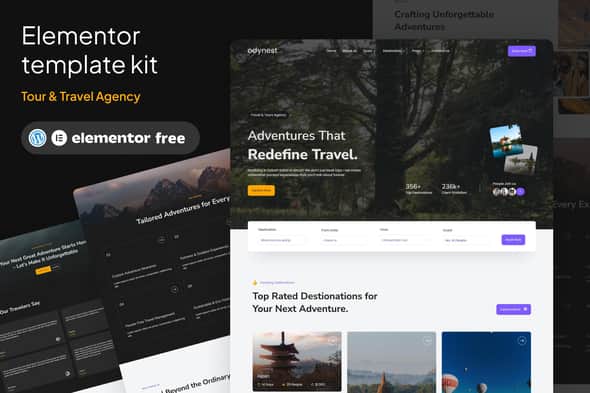
Setting up a travel agency website often involves tedious layout adjustments and custom coding for tour itineraries. Odynest provides a pre-designed collection of 18 Elementor page templates engineered specifically for tour operators, travel agencies, and booking platforms. Built to run on Elementor Free, it eliminates unnecessary code bloat while providing a flexible, component-based framework for displaying destinations, packages, and field guides.
This template kit is designed for travel agencies, tour operators, vacation planners, and web developers building travel portals for clients. It is not a standalone WordPress theme, meaning it requires a lightweight base theme (such as Hello Elementor) alongside the core page builder.
| Specification | Details |
|---|---|
| Product Type | Elementor Template Kit (Requires Page Builder) |
| WordPress Compatibility | v6.7.2 |
| Elementor Compatibility | v3.27.6 |
| Total Page Templates | 18 Pre-built Layouts |
| Required Plugins | Elementor Free, ElementsKits Lite, MetForm, Gum Elementor Addon, Qi Elementor Addon |
| Typography & Styling | 900+ Integrated Fonts, Dynamic Color Palette |
| Browser Support | Chrome, Firefox, Safari, Opera |
Included Layouts & Template Components
Odynest covers the entire user journey for travel platforms, supplying essential pages and site-wide structural blocks:
- Site Structure: Global Theme Style, Header, Footer, and 404 Error Page.
- Core Pages: Homepage, About Us, Gallery, FAQ, and Contact Us.
- Travel Assets: Tour List, Tour Detail, Destination List, Destination Detail, and Tour Guide Profiles.
- Developer Resources: Design Guidelines layout for maintaining consistent design tokens across new pages.
Setup and Configuration Overview
Because template kits deliver structural JSON data rather than theme binary files, setup follows a direct import process using standard WordPress plugins:
Importing Form Templates (MetForm)
To set up booking and inquiry forms, import the MetForm block templates first. Open the target page in Elementor, edit the MetForm widget, select a new form, and open the template library tab to insert your imported layout. Once inserted, apply changes and save the page.
Setting Up Headers and Footers (ElementsKit)
Global headers and footers are assigned under ElementsKit Header Footer menu. Create a new header or footer entry, set activation to active, set conditions to Entire Site, and load the respective header or footer template within the builder interface.
Frequently Asked Questions
Is Odynest a standalone WordPress theme?
No, Odynest is an Elementor Template Kit. It contains page designs and layout blocks built specifically for the Elementor page builder. You must install a standard base theme, such as Hello Elementor, before importing these templates.
Do I need an Elementor Pro subscription to use this kit?
No, Odynest is optimized to run on the free version of Elementor. It uses free companion plugins like ElementsKits Lite and MetForm to handle headers, footers, and contact forms without requiring Pro features.
Are the demo images included with the template files?
The templates use placeholder images from Envato Elements. To publish these graphics on a live website, you must secure licenses for the images separately or replace them with your own custom photographs.
1. Click Add to cart

2. Review your items and click Proceed to checkout

3. Fill in your billing details: Name, Email, and Password
4. Choose your preferred payment method
5. Click Pay via Paypal to proceed

6. Access Downloads to get your files

Related products


