
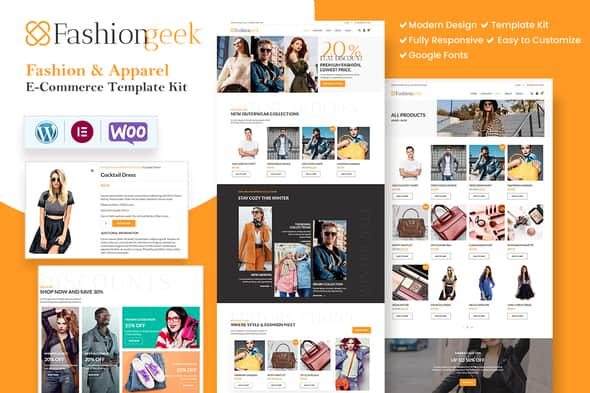
Fashion Geek – WooCommerce Fashion Elementor Pro Template Kit | Store
Original price was: $20.00.$4.00Current price is: $4.00.
Setting up a stylish online fashion storefront using WordPress often involves bloated themes and complicated CSS adjustments. Fashion Geek addresses this by offering a lightweight, modular design framework built specifically for the Elementor Pro page builder and WooCommerce.
Fashion Geek is an Elementor Pro template kit designed for fashion retailers, apparel brands, and modern e-commerce storefronts on WordPress. Built on top of the Hello Elementor framework and leveraging Flexbox containers, it supplies ready-to-use page layouts, dynamic product carousels, and visual social grids. It is ideal for developers and store owners seeking rapid site builds without theme bloat, but is not suitable for users looking for a traditional standalone WordPress theme file or non-Elementor sites.
| Technical Specification | Details |
|---|---|
| Product Type | Elementor Pro Template Kit |
| Primary Builder | Elementor / Elementor Pro |
| Base Theme Compatibility | Hello Elementor (Free) |
| E-Commerce Platform | WooCommerce |
| Required Add-ons | ElementsKit Lite, Envato Elements Plugin |
| Layout Engine | Elementor Flexbox Container |
| Customization Model | No-code Drag-and-Drop Visual Builder |
Core Features and Layout Capabilities
- Visual Drag-and-Drop Building: Customize entire page structures, elements, and typography directly within the visual editor without writing custom code.
- Global Style Controls: Modify site-wide color schemes and font settings globally from a single configuration panel.
- E-Commerce Components: Features dedicated WooCommerce layouts, including recent product carousels and organized store views.
- Social & Content Grid: Includes blog archives, single post templates, social media link integration, and an Instagram-style accordion grid layout.
- Performance Focused: Clean code architecture designed to minimize load overhead and maintain optimal page load speeds.
Installation and Import Workflow
- Theme Preparation: Install and activate the free Hello Elementor base theme, then ensure Permalinks are configured to ‘Post Name’ in WordPress settings.
- Container Activation: Verify that the Flexbox Container feature is set to Active under Elementor Settings > Features.
- Plugin Configuration: Ensure WooCommerce, Elementor, Elementor Pro, and ElementsKit Lite are active prior to template import.
- Kit Import: Upload the unzipped template kit file using the Envato Elements plugin, import Global Kit Styles first, and then import individual page templates in sequence.
- Page Setup: Create new pages, select ‘Elementor Full Width’ as the page layout, hide page titles, and insert templates from the Saved Templates library.
Frequently Asked Questions
Is Fashion Geek a standalone WordPress theme?
No, Fashion Geek is an Elementor Template Kit containing layout structure data. It must be imported into an active WordPress environment running Elementor and a compatible theme such as Hello Elementor.
Does this kit require an Elementor Pro license?
Yes, an active Elementor Pro upgrade is required to utilize advanced site elements, including custom header, footer, and WooCommerce dynamic templates built into the Theme Builder.
Are demo photos and product listings included with the download?
Demo images are provided for layout demonstration and require appropriate licensing from Envato Elements for production use. WooCommerce products must be created inside your WordPress database before store grids can populate content.
1. Click Add to cart

2. Review your items and click Proceed to checkout

3. Fill in your billing details: Name, Email, and Password
4. Choose your preferred payment method
5. Click Pay via Paypal to proceed

6. Access Downloads to get your files

Related products


