
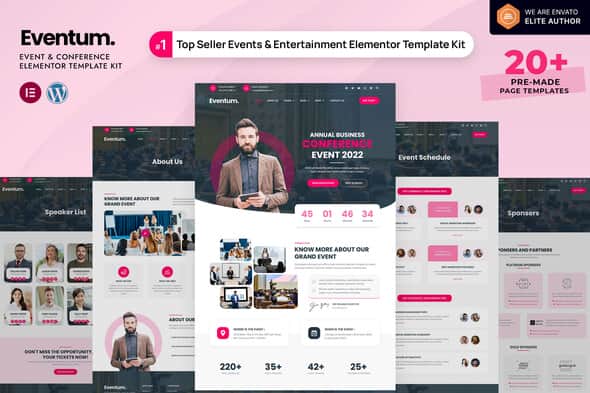
Eventum – Event & Conference Elementor Template Kit | 20+ Templates
Original price was: $27.00.$5.40Current price is: $5.40.
Setting up a dedicated portal for corporate summits, tech expos, or local festivals usually requires building custom layouts for speaker lineups and complex timetables. The Eventum Elementor Template Kit streamlines this deployment by supplying pre-built design structures tailored specifically for event management on WordPress.
Eventum is a modular template kit designed for event organizers, conference hosts, and digital agencies building WordPress sites for seminars, expos, and meetups. Powered by Elementor and ElementsKit Lite, it replaces manual front-end coding with 20+ pre-designed page layouts. Best for: Developers and site owners needing rapid assembly of conference sites with schedule and speaker integration. Not suited for: Users looking for a standalone WordPress theme that operates without page builder plugins.
| Specification | Details |
|---|---|
| Product Type | Elementor Template Kit (Not a WP Theme) |
| Page Builder | Elementor (Elementor Pro required for full features) |
| Required Plugins | Elementor, ElementsKit Lite, WooCommerce |
| Template Count | 20+ Pre-designed Page Templates |
| Layout Type | Responsive, Speed-Optimized Layouts |
| E-Commerce Ready | Includes WooCommerce Shop, Cart, Checkout & Account Pages |
Included Page Layouts & Features
The kit features a comprehensive collection of pre-designed pages that cover all aspects of event promotion, registration, and merchandise sales:
- Core Pages: Homepage, About Us, Event Schedule, Event Detail, Speaker List, Speaker Detail, Sponsors, Pricing Tables, Gallery, Testimonials, FAQ, Contact, and Coming Soon.
- E-Commerce Suite: Shop/Products Archive, Product Detail, Shopping Cart, Checkout, and My Account templates powered by WooCommerce.
- Theme Builder Templates: Custom Header, Footer, Single Page, Single Post, 404 Error Page, and Search Results layouts.
- Global Styling: Global Kit Styles enable centralized control over typography and color palettes across the entire site.
Installation Requirements & Setup
To import and customize this template kit, follow these standard operational steps:
- Install and activate the Envato Elements plugin via the WordPress admin panel.
- Navigate to Elements > Installed Kits and upload the downloaded ZIP file without unzipping it.
- Click Install Requirements if prompted by the plugin dependency banner.
- Import Global Kit Styles first to set up default colors and typography.
- Import individual page templates as needed. Imported items will appear under Templates > Saved Templates in WordPress.
- Create a new page, set the layout to Elementor Full Width in the editor settings, and load your desired kit layout from the My Templates tab.
Frequently Asked Questions
Is Eventum a standalone WordPress theme?
No, Eventum is an Elementor Template Kit. It consists of pre-designed page layouts created specifically for the Elementor page builder and requires an existing WordPress base theme to function.
Is Elementor Pro required to use all included templates?
Yes, an upgrade to Elementor Pro is necessary to access site-wide Theme Builder features, including custom header, footer, single post, and archive template options.
Can I sell tickets using this template kit?
Eventum includes dedicated WooCommerce page templates for shop listings, single product displays, carts, and checkouts, allowing you to set up ticket products or merchandise sales natively.
1. Click Add to cart

2. Review your items and click Proceed to checkout

3. Fill in your billing details: Name, Email, and Password
4. Choose your preferred payment method
5. Click Pay via Paypal to proceed

6. Access Downloads to get your files
