
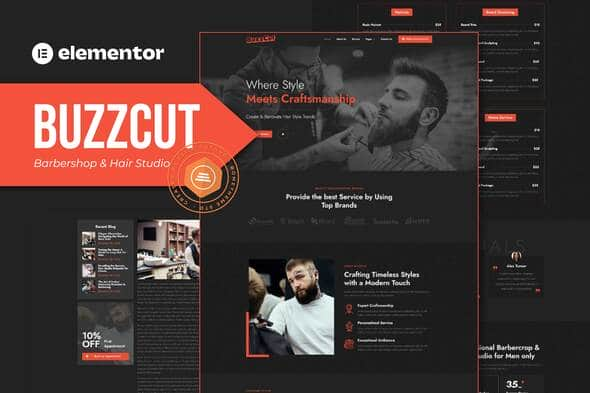
Buzzcut – Barbershop & Hair Studio Elementor Pro Template Kit
Original price was: $29.00.$5.80Current price is: $5.80.
Designing custom websites for barbershops and hair grooming studios requires a structured layout that highlights services, pricing schedules, and appointment requests without heavy custom code. The Buzzcut Elementor Pro Template Kit addresses this by supplying 13+ pre-built layout blocks configured for fast deployment via the Elementor page builder.
This digital asset is an Elementor Pro template kit built for barbershops, hair salons, and men’s grooming businesses using WordPress and the free Hello Elementor base theme. It provides a non-coded design system with 100% responsive layouts, global kit styles, and cross-browser support. It is best suited for WordPress developers and web design agencies building salon client websites quickly; it is not suited for non-WordPress platforms or standalone sites operating without Elementor installed.
| Specification | Details |
|---|---|
| Product Type | Elementor Pro Template Kit |
| Base Theme Compatibility | Hello Elementor (Free) |
| Required Plugins | Elementor, Elementor Pro (required for specific templates), ElementsKit Lite |
| Template Count | 13+ Pre-built Templates |
| Responsiveness | 100% Mobile-Friendly & Fully Responsive Layouts |
| Browser Compatibility | Chrome, Firefox, Safari, Opera |
| Customization System | Global Kit Styles (Centralized Fonts & Colors) |
Included Templates & Layout Components
The kit features a comprehensive collection of pre-designed pages tailored specifically for service-oriented grooming businesses:
- Homepage: Main conversion landing page with hero sections, service highlights, and CTA areas.
- About Us: Company background, brand mission, and studio story setup.
- Services: Detailed service breakdown for haircuts, beard trimming, and styling packages.
- Pricing Plan: Structured rate cards and service pricing tables.
- Team: Barber profile displays showcasing individual staff members.
- FAQs: Collapsible question-and-answer layout for customer inquiries.
- Blog & Single Post: Article index and detailed post layouts for content marketing.
- Contact Us: Location details, contact forms, and operating hours display.
- Archive & 404: Dynamic post taxonomy archives and custom error page layout.
- Header & Footer: Theme Builder template parts for sitewide navigation and footer widgets.
Configuration and Template Import Steps
Because this asset is a Template Kit rather than a WordPress theme, setup follows a specific import routine:
- Ensure your WordPress Permalinks structure is set to Post Name under Settings > Permalinks.
- Install and activate the free Hello Elementor theme via Appearance > Themes.
- Install the Elementor and Envato Elements plugins. Connect your active Elementor Pro account to enable pro-level template dependencies.
- Navigate to Elements > Installed Kits and click Upload Template Kit Zip without unzipping the downloaded file.
- Click Install Requirements on the yellow banner to automatically configure required helper plugins like ElementsKit Lite.
- Import the Global Kit Styles first to establish global typography, color variables, and container defaults.
- Import individual page templates in sequence. These will be stored under Templates > Saved Templates for insert into new Elementor pages set to full-width mode.
Frequently Asked Questions
Is Buzzcut a standalone WordPress theme?
No, Buzzcut is an Elementor Template Kit containing UI layout data designed specifically for Elementor page builder. It must be imported into an existing WordPress installation running the Hello Elementor base theme.
Does this kit require an Elementor Pro license?
Yes, while the core structure utilizes free plugins like ElementsKit Lite, full functionality and specific template parts—such as custom headers, footers, and archive templates—require Elementor Pro.
Can I customize global colors and typography easily?
Yes, all typography presets and color schemes are mapped to Elementor’s Global Kit Style system. Changing color or font settings in the master style panel automatically updates all imported templates across the site.
1. Click Add to cart

2. Review your items and click Proceed to checkout

3. Fill in your billing details: Name, Email, and Password
4. Choose your preferred payment method
5. Click Pay via Paypal to proceed

6. Access Downloads to get your files

Related products


