
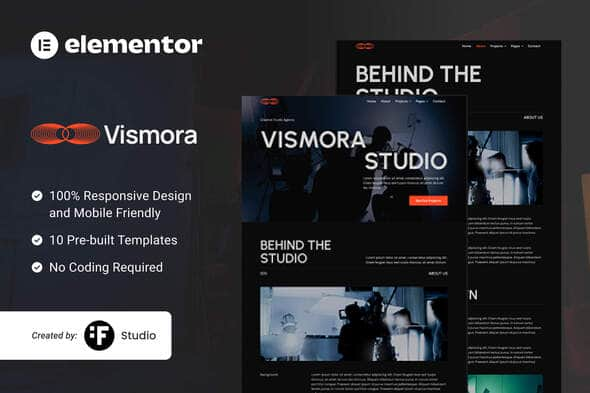
Vismora — Elementor Template Kit for Creative Studios | Clean Design
Original price was: $29.00.$5.80Current price is: $5.80.
Building an agency website often involves unnecessary overhead from bloated theme frameworks. Vismora delivers a streamlined visual layout system tailored for modern digital agencies, freelance portfolios, and branding studios. This Elementor template kit includes 10 structured page layouts engineered for deployment alongside the free version of Elementor. It is best suited for creative agencies, design firms, and independent freelancers seeking a fast setup process, while it is not suited for projects requiring native e-commerce engine integration or dynamic custom post-type databases out of the box.
Technical Specifications
| Product Type | Elementor Template Kit (Not a WordPress Theme) |
|---|---|
| Page Count | 10 Pre-built Page Templates |
| Core Builder | Elementor (Free Version Compatible) |
| Required Plugins | Elementor, Jeg Elementor Kit, ElementsKit, MetForm, Header Footer & Blocks Template |
| Typography | Urbanist, DM Sans |
| Included Layouts | Home, About, Projects, Service, Gallery, Blog, Contact, Project Detail, Single Blog, 404 |
Included Page Templates
- Home: High-impact landing page layout tailored for core agency messaging.
- About: Dedicated presentation layout for studio background and team structure.
- Projects & Project Detail: Structured showcase pages for client case studies and portfolio items.
- Services & Gallery: Clear display areas for technical offerings and visual work.
- Blog & Single Blog: Standard article index and single post layouts for editorial content.
- Contact: Integrated layout containing ready-to-configure contact form sections.
- 404 Page: Utility layout for missing site routes.
Setup and Integration Guide
Header Configuration via Jeg Elementor Kit
To ensure global headers render correctly across all pages, verify that your active pages use the Elementor Full Width template setting. Users running Elementor Pro can manage headers via Theme Builder. For standard installations using the Jeg Elementor Kit plugin:
- Navigate to Jeg Elementor Kit > Header Template within the WordPress admin dashboard.
- Select Add New Header, assign the condition to All Site, and click Create.
- Click the edit pencil to open the visual builder.
- Click the folder icon to switch to the My Templates tab.
- Locate the imported header layout, insert it into the canvas, customize as needed, and save changes.
MetForm Custom Form Import
- Open the specific page containing your form inside the Elementor editor and select the MetForm widget.
- Click Edit Form in the left control panel.
- Choose New, select a blank layout, and click the Edit Form button.
- Select the folder icon to access your saved templates.
- Navigate to My Templates, choose the imported MetForm template file, and click Insert.
- Update the widget settings and save the page layout.
Note: Demo images provided within this kit are sourced from Envato Elements. Live website deployments require licensing these assets separately or replacing them with original media.
Frequently Asked Questions
Does Vismora require a paid Elementor Pro subscription?
No, Vismora operates fully using the free version of Elementor. Essential site structures like custom headers, footers, and web forms are managed through standard free companion plugins like Jeg Elementor Kit and MetForm.
Is Vismora installed like a standard WordPress theme?
No, template kits do not function as standalone themes. Vismora contains structural visual layouts that must be imported into an existing WordPress site running Elementor via the Envato Elements plugin or Elementor’s template importer.
How are custom form submissions handled in this kit?
Form layouts rely on the MetForm plugin. Individual form layouts are imported directly into the MetForm widget on your target pages, allowing you to configure notification emails and field parameters within the WordPress dashboard.
1. Click Add to cart

2. Review your items and click Proceed to checkout

3. Fill in your billing details: Name, Email, and Password
4. Choose your preferred payment method
5. Click Pay via Paypal to proceed

6. Access Downloads to get your files

Related products


